Internal vs External Load Balancers
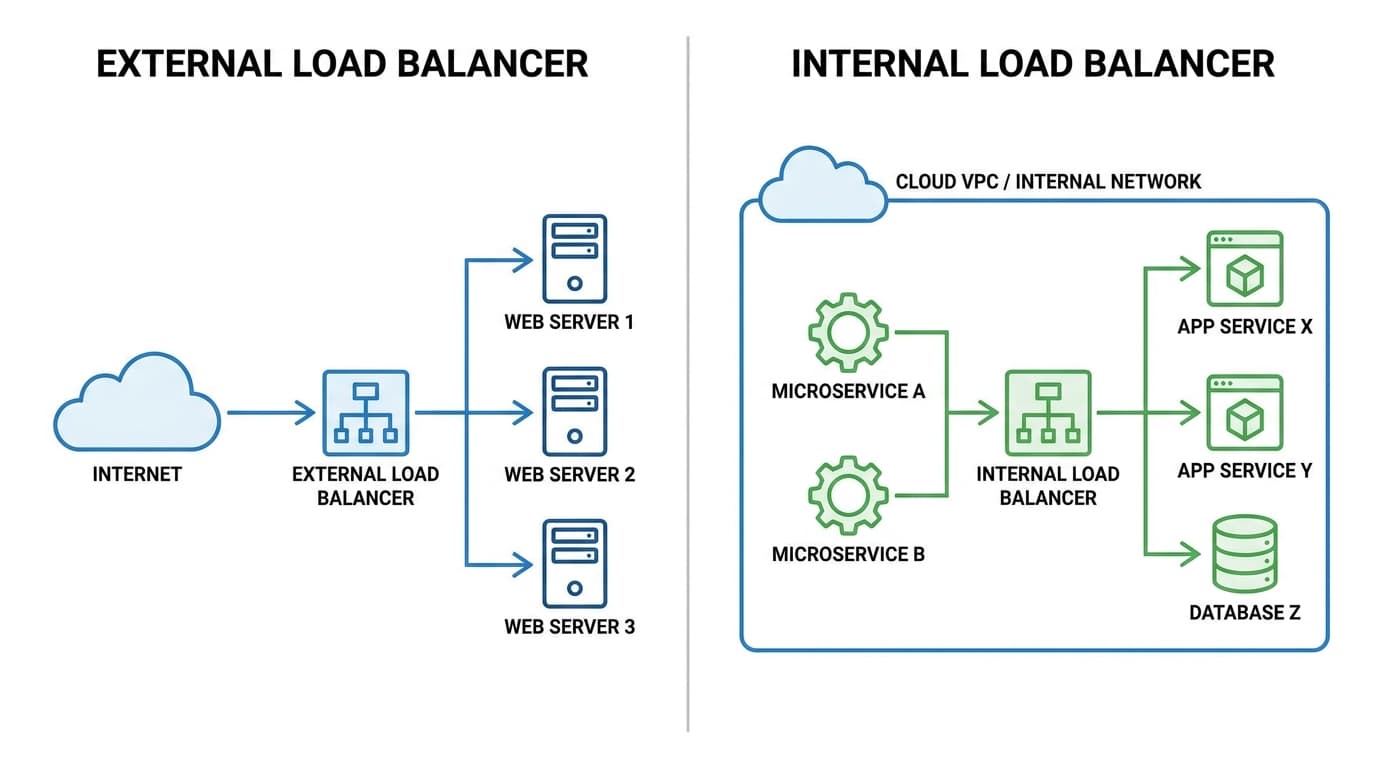
TL;DR: External load balancers direct public internet traffic to internal services using a public IP address. In contrast, internal load balancers manage traffic exclusively within a private network, routing requests between internal resources. Understanding this key difference is essential for building scalable and secure application architectures.
Key facts
- Category
- Infrastructure
- Impact
- Low
- Published
- Source
- Dev.to
Full summary
External load balancers handle internet traffic, while internal ones manage traffic within your private network. This distinction is key for secure system design.
An external load balancer, often called an internet-facing load balancer, serves as the primary entry point for traffic coming from the public internet. It is assigned a public IP address that is accessible to anyone online. When users, mobile applications, or other external systems send requests to this public IP, the load balancer intercepts them. It then intelligently distributes this traffic across a pool of backend servers, such as web or application servers, located within your private network. This distribution prevents any single server from becoming a bottleneck, ensuring high availability and responsiveness for your public-facing applications.
An internal load balancer, on the other hand, operates exclusively within the confines of a private network. It does not have a public IP address and cannot be reached from the internet. Its primary function is to manage and distribute traffic that originates from inside your own network. For instance, it can balance requests between different internal services, like routing traffic from a web server tier to a database tier or between various microservices. This architectural pattern is fundamental for creating secure, multi-layered applications. By isolating backend components from direct public access, internal load balancers significantly enhance security and improve the efficiency of internal service communication, a key consideration for CTOs and security teams.
Tags
Related on Notifire
Related stories
Primary source: Dev.to